Master Affiliate Profits ReviewHow to Build Your Own Affiliate Marketing Study System: 6 Steps
How to Build Your Own Affiliate Marketing Study System: 6 Steps

The short answer
Affiliate marketing is earning a commission by promoting another company's product through your own tracked link. To learn it from free sources, build a personal study system: save each source with its URL and date, write notes in your own words, record where each claim came from, mark when you last checked it, and review the notes on a schedule. Keeping your own dated record stops outdated or sales-driven advice from quietly shaping your decisions.
Some links on this site are affiliate links: if you buy through one, the site may earn a commission at no extra cost to you. More about this.
By the end of this guide, you will have a working notes system you can set up in an afternoon, using a spreadsheet or a plain folder of documents. Each step is written for someone starting from zero, with no prior blogging or marketing background needed.
The steps are built around the way free material actually behaves. PDFs and video lessons go stale, and many free resources act as lead magnets for a paid upgrade. Your system is meant to catch both problems early.
Here is what the guide covers:
- Setting up a source log: a simple table that records every resource you read or watch, with its URL and the date you saved it.
- Writing notes in your own words: why paraphrasing forces you to understand a claim before you rely on it.
- Tagging where each claim came from: linking every point back to its original source so you can check it later.
- Marking the last-checked date: how to flag notes that may no longer match current platform rules or program terms.
- Scheduling reviews: a routine for revisiting your notes so old advice gets retired instead of lingering.
- Spotting sales-driven material: how to separate teaching from pitching as you add each source.
I have built this system around my own preference for keeping notes in a spreadsheet rather than a notes app, because the date and source columns are easy to sort. That is a habit I find practical, not a finding from any test. The steps also work in a folder of text files if you prefer that.
Along the way, you will see how this approach fits into a wider set of pages on this site. Our hub page on Master Affiliate Profits covers what that program includes and costs, and our page on free affiliate marketing PDFs explains how to check their accuracy and currency before you rely on them. The steps here give you the record-keeping that makes those checks possible.
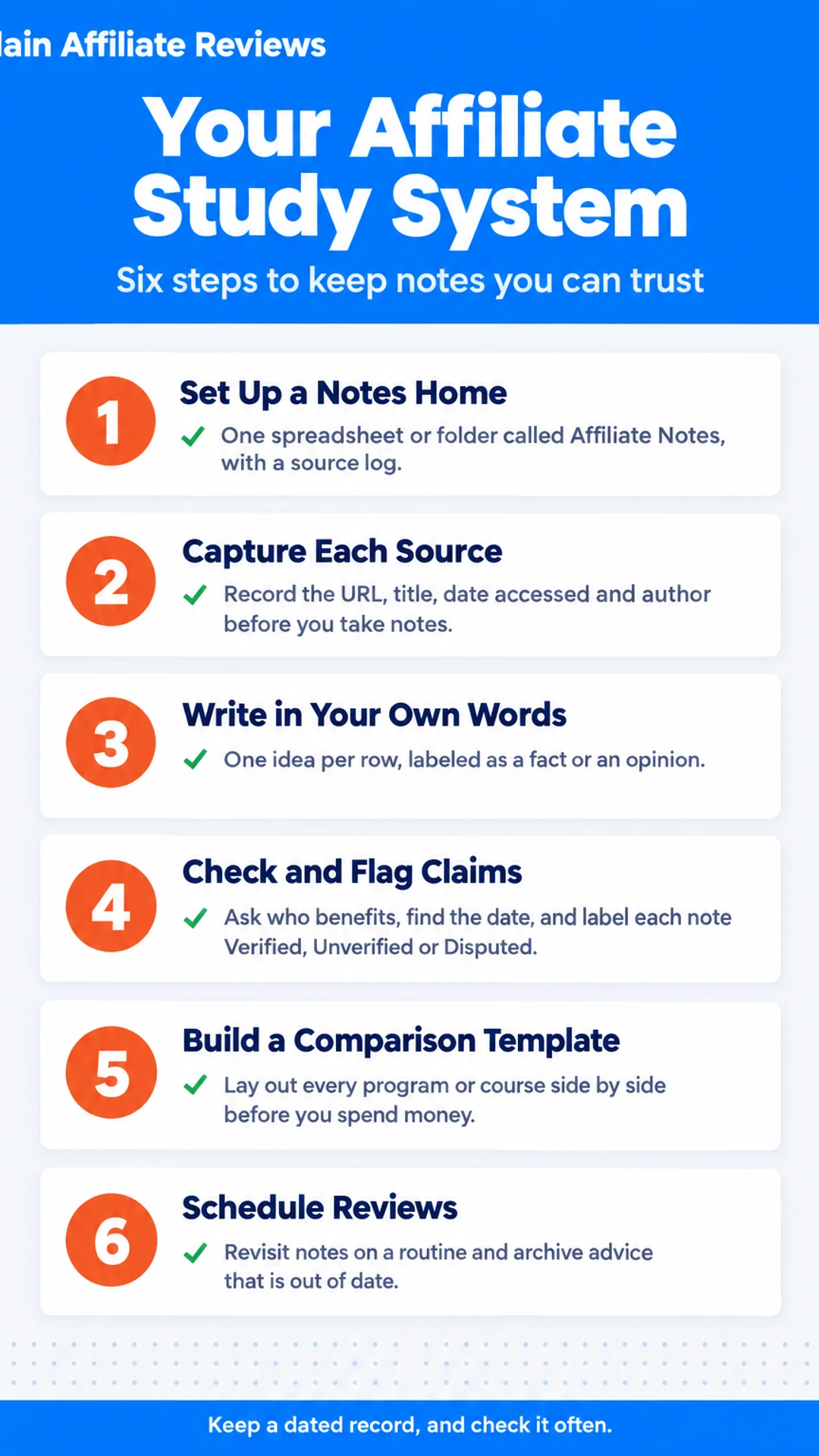
Six Steps at a Glance
| Step | What you do |
|---|---|
| Step 1 | Create one notes home and a source log |
| Step 2 | Record URL, title, date accessed and author |
| Step 3 | Write one idea per note in your own words |
| Step 4 | Test each claim and flag bias |
| Step 5 | Build a comparison template for programs |
| Step 6 | Schedule reviews and archive outdated notes |
Step 1: Set Up a Notes Home and a Source Log
Every project starts with research, and research gets messy fast. Before you read another article or watch another video, give yourself one place for every note and one log for every source. That single habit saves you from hunting through browser tabs later, when you need to check a rate or a claim.
What you need:
- One tool you will actually open every week, such as a notes app, a spreadsheet, or a plain document. Pick the one you already use. The tool you keep opening is the one that will serve you.
- A place to store it, such as a dedicated folder in your cloud drive.
How to set it up:
- Open your chosen tool and create one master file or folder called "Affiliate Notes."
- Inside a spreadsheet, add a source log with these columns: Title, Author or Channel, URL, Date Accessed, Type (article, PDF, or video).
- Add one row per source as you use it, even before you take notes.
- Pick one naming pattern for note files, such as
YYYY-MM-DD_topic_source, so files sort by date and topic. For example,2024-03-12_commission-rates_nobsimreviews.
[screenshot: a spreadsheet with the five source-log columns and two sample rows]
Example: If you watch a YouTube review of an affiliate program, log the channel name, the video URL, today's date, and "video." Then save your notes under the same naming pattern. When you revisit the video months later to check a claim, you know exactly where it came from.
Step 2: Capture Each Source With Its Details
Start capturing details the moment you open a source, not after you have finished reading. Memory fades fast, and a note without a URL is hard to trust later.
For every source, record these four things before you take a single note:
- Full URL, copied from the address bar (not a shortened link)
- Title of the page, video or PDF
- Date accessed, written as a full date such as 14 March 2025
- Author or channel name, if one is shown
Save them together in one line at the top of your notes file, so each source has its own header. For example:
Source: "Master Affiliate Profits Review - What You Need To Know!" | NoBSIMReviews | https://www.youtube.com/watch?v=oTSeHgJUTEA | Accessed 14 March 2025
[screenshot: a notes document with a source header block at the top of a page, showing URL, title, channel and access date]
For videos, note the timestamp beside every point you record. Reviewers often make their strongest claims at specific moments, and a timestamp lets you find the exact context again. In that same review, the claim that most public reviews are written by affiliates appears at [1:14], so write it as "[1:14] most public reviews written by affiliates" rather than a loose summary.
For anything that may change or disappear, save a copy. Sales pages get rewritten, prices shift and PDFs get quietly replaced. Use a full-page screenshot or save the page as a PDF, and label the file with the date. A PDF with no version number is especially worth archiving, because otherwise you have no way to show what it said when you cited it.
Step 3: Write Notes in Your Own Words, One Idea Per Entry
Once you have your sources, write notes you can actually use later. Open a spreadsheet or a plain document and make a row for each claim. Keep one idea per row, and write it in your own words so you know what you meant when you come back to it.
For each row, record these columns:
- Claim: one sentence stating a single idea
- Source: the page, video or PDF it came from, with a link
- Date checked: when you read it
- Type: Fact or Opinion
Label facts and opinions clearly. A commission rate or a cookie length is a fact you can check against the program's terms. A reviewer's verdict, such as "this model is high risk," is an opinion. Mark it that way so you do not treat it as established.
Keep quotes to a few words, or none. Paraphrase the rest.
Example: A YouTube reviewer says most public write-ups of one program come from people who sell it. Your row might read: "Claim: Many public reviews of this program come from affiliates. Source: [video title, timestamp 1:14]. Date checked: [date]. Type: Opinion (reviewer's view)."
[screenshot: spreadsheet with four columns, Claim, Source, Date checked, Type, and two example rows]
Step 4: Check Each Claim and Flag Bias
Before you rely on a note, test it. A claim can be accurate, outdated, or shaped by whoever benefits from you believing it. This step gives you three quick checks to run on every note in your study system.
Check 1: Ask who benefits. If you believe this claim, who gains? Sort the answer into one of three groups:
- The author, through ad revenue, a personal brand, or a consulting pitch
- A program that pays commissions when you sign up or buy
- A course seller who wants you to enroll
A claim that favors any of these is not automatically false, but you should read it with that motive in mind.
Check 2: Find the date and the source. Look for a published or updated date on the page. Then find the terms, data, or source the claim depends on. Write down whether you could confirm them. If the claim cites a rate, check the program's own terms page rather than a review quoting it.
Check 3: Label and date each note. Add one of three labels:
- Verified: you confirmed it against a primary source
- Unverified: you could not confirm it yet
- Disputed: a credible source contradicts it
Record the date you last checked it, for example Last checked: 12 March.
Example: A review says a program pays 75 percent commission. You check the program's published terms, find no such figure, and mark the note Disputed, with the date and a link to the terms you read.
[screenshot: a study note with the three fields (label, last-checked date, source link) filled in]
Label Options for Each Note
| Label | When to use it |
|---|---|
| Verified | Confirmed against a primary source |
| Unverified | Not yet confirmed |
| Disputed | A credible source contradicts it |
Step 5: Build a Comparison Template for Programs and Courses
Before you spend money on any offer, put every option you are considering into the same table. Matching fields make gaps obvious. A program that hides its price looks different once the empty cell sits next to a competitor's stated figure.
Create a spreadsheet with one row per program or course and these columns:
- Price stated (the exact figure, with the date you saw it and the page it came from)
- What is locked behind upgrades
- Payout terms (commission rate, payment threshold, payment schedule, and who pays)
- What the source does not say
Next, split your sources into two tabs. On one tab, record the sales page, checkout, and any promotional video or webinar. On the second tab, record independent reviews. For each review, note the reviewer's name, the date, the link, and any affiliate relationship they disclose. If a reviewer says nothing about that, leave the field blank. A review that earns money from the product is not automatically wrong, but you should know it before you weigh it.
Leave a field empty when the source does not give the answer. Do not fill it with a guess. A blank cell tells you the seller has not disclosed that detail, which is useful in itself.
[screenshot: spreadsheet with two tabs, columns for price, upgrades, payout terms, and "not stated", and an independent review tab with reviewer name and disclosure columns]
For example, one reviewer of Master Affiliate Profits, NoBSIMReviews, describes the orientation as a webinar pitch for a $797 platinum tier needed to earn the 75% commission. In your sheet, that becomes the price cell with a timestamp, the "locked behind upgrade" cell, and the commission cell, each linked to its source. The Master Affiliate Profits program is covered in its own hub page, so use this template to check its claims against yours.
Step 6: Schedule Reviews and Retire Outdated Notes
A study system is only useful while it stays accurate. Notes on programs and platforms go stale quickly: rates change, cookie windows shrink, and platforms rewrite their policies without much warning. Scheduled reviews keep your notes honest.
What you need: your notes file or app, a calendar, and a short "source" column for each note.
How to do it:
- Set a fixed review date. Pick a cadence you will actually keep, such as the first Monday of every third month. Put it in your calendar with a reminder.
- Re-check time-sensitive notes first. Commission rates, payout thresholds, cookie durations, and platform policies belong at the top of the list. Open each original source and confirm the figure still matches. Note the date you checked it.
- Archive, don't delete. When a note no longer holds, move it to an "Archive" folder and add a line saying what changed and when. Deleting erases the history you need to see how a program or platform evolved.
- Log new sources as you find them. Add the URL, author, and date to your source log at the moment you save the note. Skip this and you will not know later where a claim came from.
- Link related notes. Connect notes that cover the same product, platform, or audience. Patterns across sources often show up only when related notes sit side by side.
Example: Suppose your note says a program pays a fixed commission rate, recorded from a page you saved last spring. At your review, the current terms page shows a lower rate. You do not edit the old line in place. You move it to the archive with a note such as "Replaced on review, rate changed," then add the new figure with its source and date. Months later you can see exactly when the change happened.
[screenshot: a notes table with columns for Note, Source, Date checked, Status (Current or Archived), and Linked notes]
What to do now
- ☐ Create one Affiliate Notes file or folder to hold every note
- ☐ Build a source log with Title, Author or Channel, URL, Date Accessed, and Type columns
- ☐ Pick one naming pattern for note files so they sort by date and topic
- ☐ Record the full URL, title, author or channel, and access date before taking notes
- ☐ Note timestamps beside each point when capturing video sources
- ☐ Save a dated copy of any page or PDF that may change or disappear
- ☐ Write each claim in your own words as one idea per row, labeled Fact or Opinion
- ☐ Check each claim for who benefits and the source date, then mark it Verified, Unverified, or Disputed
What hands-on reviewers found
These are other people's hands-on tests, summarised and credited to them. Watch the full videos for their complete reviews.
NoBSIMReviews: Master Affiliate Profits Review - What You Need To Know!
The reviewer concludes that Master Affiliate Profits is not a scam and that experienced marketers with existing traffic can make money with it, but that its upgrade-to-earn structure makes it a high-risk pay-to-play model that resembles a p
- The reviewer says most public reviews of MAP are written by affiliates, and cites a Reddit review that reads as an AI-written sales pitch without explaining how the platform works. (at 1:14)
- The reviewer notes the MAP Hall of Fame leaderboard looks impressive, but most listed earners already have existing audiences to promote MAP to. (at 1:39)
- The reviewer says MAP is not a scam and that, with existing traffic, they could generate a lot of commissions by plugging it into their channels. (at 2:11)
The InBetween: Master Affiliate Profits Review - Is This System Legit?
Erica thinks Master Affiliate Profits is a training system with heavy upsells and a traffic-dependent income model she would not rely on, and she prefers her own digital leasing model.
- Says the training is simple and organized, which suits beginners, but several features stay locked unless the buyer upgrades. (at 1:14)
- Reports that the lower membership levels include basic training while most bigger features sit behind upgrades, with Platinum presented as the level that unlocks free traffic rotation. (at 2:04)
- Notes that online reviews mix praise for the organized training and lead ownership with complaints about constant upsell reminders, shallow training depth, weak traffic rotation and autoresponder compatibility. (at 3:16)
Frequently asked questions
What is affiliate marketing?
Affiliate marketing is a way to earn a commission by recommending another company's product or service. You share a unique tracking link, and when someone clicks it and buys, you receive a share of the sale. Most affiliates earn through blogs, websites, email lists or social channels that send readers toward the offer.
What are the big 3 niches?
The three niches most often cited in affiliate marketing are health and fitness, personal finance, and software or technology. They are popular because people search for them often and buy products related to them. Competition in each is heavy, so beginners usually do better picking a narrower sub-topic within one of them.
Is affiliate marketing still good in 2026?
Affiliate marketing can still earn money, but results depend on the audience you build and the trust you earn. Income rarely appears quickly, and it usually comes from consistent content and honest recommendations rather than shortcuts. Whether it is worth your time depends on your starting point and how long you can keep working at it.
What are the three main types of affiliates?
The three main types are content affiliates, who publish reviews, guides and articles; influencer affiliates, who promote products through video or social media; and coupon or deal affiliates, who share discount codes and offers. Each type reaches buyers differently and needs different skills to build an audience.
What should I look for before paying for an affiliate course?
Check whether the course shows the actual lessons, names who teaches them, and explains how students make money in practical terms. Be wary of courses that focus mainly on upsells or income claims without showing the work involved. Comparing a free source and a paid option side by side will reveal what the paid version adds.
Conclusion
Which step will you try first: setting up your note template, sourcing your notes, or dating and checking what you have written down?
Start small. Pick one free source and build a single set of dated, sourced notes from it before adding more.
If you are also weighing a paid option, Visit the official site to see what the Master Affiliate Profits offer includes and decide whether it fits your situation.